Accessories

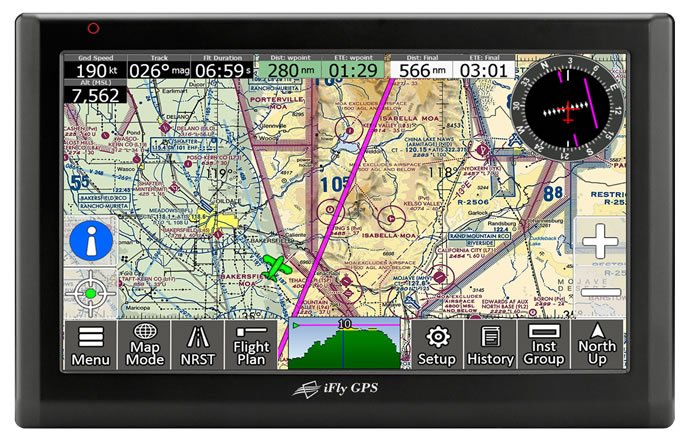
Adventure Pilot 740 GPS: Tablet-Based Navigator

Before full-size tablet computers made their way to the cockpit, the Adventure Pilot iFly 700 GPS navigator earned respect as a capable big-screen chart reader. As a bonus, the iFly tablet could serve double-duty as a portable GPS. But there was one problem: Garmin. It dominated the market by rolling out model after model of portable navigators, including the aera series and eventually, the GPS696, which is still in the lineup today.

Read More »

IFly GPS Standout Features

Clockwise from upper left: A screenshot of the iFly RealView imaging feature displaying a satellite view of Hartford Brainard Airport in Connecticut. The course line shows navigation to the center of field. This utility makes it easy to find an unfamiliar airfield, in our view. Basic round-gauge instruments, including HSI, groundspeed and GPS altitude are highly configurable. Pitch and roll data can be displayed on a round-gauge horizon display with an appropriate AHRS input. The square to the left of the groundspeed indicator is a traffic alert box, for displaying ADS-B traffic data. Chubby fingers will get along we’ll with the onscreen keyboard. It is used for entering flight plan data and for searching waypoints. The iFly GPS app shares the same feature set and graphics as the iFly GPS 720, and the improved iFly 740 dedicated tablet navigators.

Read More »

Letters: March 2015

I always enjoy reading Aviation Consumer, and it was nice to see the article on survival kits in your February 2015 issue. I wont pick the article apart and go into what should have been included, but it would be nice to see future articles on survival kits for different geographical regions, such as the tropics, the desert and so forth because each area has its own challenges.

Read More »

Deal Carefully on a Used GNS530W

While Avidynes IFD540 plug-and-play GPS navigator is opening the flood gates for removed Garmin GNS530W systems, don’t look for steal deals. Private sellers and reputable retailers-which we define as established avionics shops with Garmin and Avidyne dealerships-sell the units for $8000-$9000, on average. This price should include a mounting rack, connector kit, connector backplate and GPS antenna. It likely wont include a navigational indicator, the preferred standalone choice being Garmins GI106A. Its a high-quality OBS resolver-style indicator equipped with integral nav source mode annunciation. Add $2500, on average, to the project for a new one, although there are some on the used market for a bit less. The King KI209A indicator will work, too. The KI209A is often paired with the BendixKing KX155A/KLN-series GPS package found in early 2000-vintage Cessnas and in some later Piper models. Most analog and electronic HSI systems will work, too. Use caution, however, with Sandel SN3308 EHSI displays that have older software. Budget $2000 to have it upgraded so it can display the WAAS GPS glideslope signal from a GNS530W/430W.

Read More »

ForeFlight Mobil 6.6: Synthetic Vision, MOS

As much as we like the ForeFlight Mobil app for iPad, weve been waiting for more advanced features that make better use of the iPads processing horsepower. The short list included synthetic vision and a better HSI presentation. Thats just what ForeFlight has done with the latest version 6.6 upgrade. It includes intelligent, next-gen synthetic vision that we think betters aging certified displays.

Read More »

Cockpit Tablet Shootout: Apple Versus Samsung

With increasing disenchantment with Apples market dominance and high-cost accessories, some pilots have been asking the $500 question: Is Samsungs mid-sized Galaxy Tab S 8.4 good enough to ditch the iPad once and for all? In evaluating new navigation apps for Android we were impressed with the Galaxy tablet, and the more we used it in a variety of cockpits, the more we preferred it over the original iPad mini.

Read More »

MINI 3 VS GALAXY TAB S 8.4

The chassis dimensions speak for themselves. The Galaxy Tab S, right, is slightly longer, narrower and thinner than the iPad mini 3, left. That makes the iPad slightly better for viewing approach plates, in our view. Notice the fewer main menu icons on the Galaxy thats running Garmins Pilot mobile app? Thats because Garmins Android version of the app doesnt support synthetic vision, terrain/obstacle alerting and static maps. It wont display traffic alerts, but it will display ADS-B traffic targets. Also missing is chart annotation capability-thats where you can scribble notes and draw on a georeferenced approach chart.

Read More »

Letters: December 2014

I just read with much interest your review of the Beech 35 series in the November 2014 issue of Aviation Consumer. My family and I owned an A35 for 10 years (thats it in the lower photo), having sold it for upgrade to an A36. I tend to agree with most of your points, with a few exceptions and critical points you left out.

Read More »

FlyQ EFB 1.4 for iPad: Alive and Improved

Although there was some pushback when AOPA offered its fee-based tablet navigation app, FlyQ EFB, there was enough to like, including an intuitive and shallow feature set and large onscreen characters. While Seattle Avionics owned all of the rights to the FlyQ EFB, AOPA was criticized for competing in the crowded app market.

Read More »

Bad Elf GPS Pro+: Barometer, GLONASS

Navigation apps require reliable GPS position input for georeferencing, which is the ownship data that’s displayed on electronic charts and maps. The built-in GPS on many tablets might not be reliable enough without cell phone tower assist, especially in the cabin at higher altitudes. That’s why a wireless GPS receiver remains an integral component for cockpit tablet use.

Read More »

Cirrus Fuel Sender Mod: G1/G2-Challenged

Last winter we reported on the CIES digital fuel sender retrofit for earlier Cirrus models. To recap, the modification is intended to better the accuracy of the original analog float-type fuel quantity senders used in first and second generation SR20 and SR22 aircraft.

Read More »

Cheap Flight Timers: No Frills Functionality

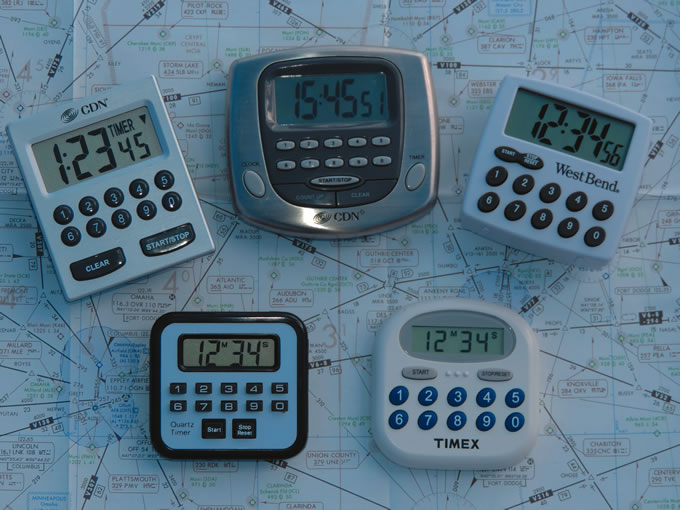
Given today’s avionics and RNAV approaches, do you really need a timer? Truth is, many of the devices in our panels and on our portable gadgets already have a timer built in. Using that timer, however, can be a challenge as the sequence of commands to access it in the Garmin G1000, for instance, might not be something you’re going to always remember or find sufficiently convenient. So, we think a dedicated, standalone timer is still useful. Sure, you could use the timer function in your smartphone, on the Pebble Smart watch or the one in Garmin’s D2 pilot watch, but we think timers are best placed within the instrument scan.

Read More »