











If youre a fan of The Military Channel, you will have seen video shot through the head-up display in a modern fighter, say an F-16 or an F-18. Paste a blue-and-brown background on that and move it off the canopy and into the center of the panel and thats a good approximation of what its like to fly the Chelton FlightLogic EFIS. And thats to say its entirely different from the Garmin G1000 and Avidynes Entegra.
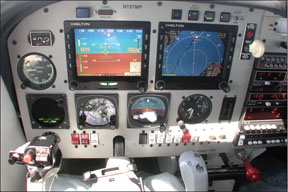
Owner Lloyd Zand, whose Miami-based Mooney PFM conversion we flew for this report, is right when he describes the FlightLogic as more dynamic than either of the other two systems, which concentrate computing power on mimicking the look of the steam gauges youre used to. The FlightLogic uses a different paradigm that, in our view, encourages a more complete and three-dimensional sense of position awareness.
It does this through clever use of symbology that any military pilot would recognize and it operates on the notion that burning up display real estate to show the airplanes attitude is less important than showing where the airplane is and where it will be a few seconds from now. Further, the FlightLogic gives the pilot a direct visual representation of position rather than relying on an electronic abstraction of steam gauges, as the Garmin and Avidyne do.
SymbolsLike all EFIS systems, the FlightLogic has a primary flight display on the left and a multi-function display for map data on the right, although, as mentioned, the displays are small enough to allow vertical pairing in larger aircraft. Lets examine the PFD first, which is the most innovative aspect of the Chelton design. Rather than an electronic version of a traditional attitude indicator, the FlightLogic relies on a handful of symbols projected against the three-dimensional backdrop of the terrain/sky representation.
The two primary symbols are the flight path marker-a bulls-eye circle with three radial lines-and the waterline, a small elongated W. Both of these move fluidly with aircraft movement, with the flight path marker indicating where the aircraft is going and the waterline showing which direction its pointed. On the imaginary calm day in level flight, the two may almost align; when they arent, the airplane is either slipping or crabbed into the wind or pitched off the waterline.
There is a horizon line on the PFD, but its easy to miss. In flat terrain, it appears as a thin white line along the virtual depicted terrain, while in hilly terrain it cuts through the terrain. In level flight, anything above the line is above the real horizon, anything under is below the horizon.
For pitch, the FlightLogic projects a 10-degree up/down scale in the center of the display and another symbol called the pitch limit indicator-a half-round shape with two radial arms or wings-is best thought of as visual energy indicator. It moves down toward the flight path indicator as the airplane approaches stall speed, turning amber at 20 knots above the clean stall speed and red at 5 knots over stall. Since the FlightLogic senses flight loading, the stall speeds are G-corrected.
One difficulty pilots have in transitioning to glass is airspeed and altitude indications with tape displays, rather than analog hands. The FlightLogic has the usual airspeed tape on the left and altimeter tape on the right, but also a tape heading along the top edge of the screen. This is a throwback to the age of the ancient magnetic compass, in our view, and not the FlightLogics strongest feature. However, there’s a solution. Actually multiple solutions: An HSI can be optionally overlaid on the flightpath marker, which makes the view a little cluttery or, alternatively, the MFD can be configured with an HSI page, thus in a vertical pairing, you can set-up the best of all worlds.