











Was it really four years ago when Garmin blew us away with the GPSmap 396, a stunningly capable portable that offered datalink weather and even traffic? Indeed it was and now the 396 is about to be consigned to the boneyard, an inevitable victim of the relentless product cycle. The new arrival doing the displacing is called the aera and its being sold by Garmin at four price points, each with a different feature set. (See the chart on page 6 for details.) In aviations glory days, the manufacturers frequently introduced what we called “parts bin” airplanes, new models fashioned from the bits of existing airplanes in the product line. Garmin has done its version of the same, leveraging the hardware from its terrestrial or marine lines into aviation products and vice versa. The aera products were morphed from Garmins street navigator suite, specifically a premium product for the motorcycle market called the zumo. But were told its more clean sheet than adaptation. Unlike previous portables, the aera represents a substantial operating logic departure in that its entirely touchscreen driven-gone is the rocker switch and the push-enter-to-activate-editing function. In fact, gone are all the buttons and keys-only one remains: the power switch. The operating logic seems to more or less parallel Garmins nuvi line of street navigators, which is to say the menu structure is icon based and as simple to use as an iPhone. No one should have trouble learning this device.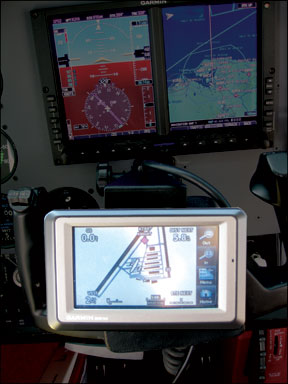
Hardware
The aera series has a 4.3 inch QVGA display screen thats a half inch in larger on the diagonal than the 396/496 series. That gives a 28 percent increase in area. The display is a backscreen illuminated TFT LCD whose touchscreen function works by sensing the users finger pressure. Overall, the device measures 5.2 by 3.25 inches and is 1 inch deep, making if not a more compact package than 396/496, at least one that uses its footprint for display more efficiently. The aera weighs 12 ounces.
The yoke mounting is standard stuff, except for one nice touch: Instead of snapping into its cradle with force fit plastic tabs, the aeras cradle has a pair of spring-loaded tabs controlled by a squeeze button. This makes it positive and easy to use, with little chance of popping out in turbulence. And speaking of turbulence, arent touch keys supposed to be difficult to use in green air? We hear this a lot, but the aera proved no more difficult-and maybe even a little less difficult-to manipulate in bumpy air than other portables have. The trick is to lock your hand in place with the thumb and middle finger and use your index finger to touch the keys. A little slower than just jabbing the keys, but its effective.
The manual we were provided gave no battery life, but we would say four hours is about the limit, but less if the screen is on max bright and/or the XM antenna is connected. The XM receiver is in the aera itself, but the antenna requires power. So plan on ships power to allow continuous usage at maximum screen brightness. The power cable is part of the yoke mount and it mates through a multi-pin connector on the back of the navigator. (To protect against pin damage, the springloaded pins contact a flat round contact, not a female receptacle.) The power cable merges with a data cable that